FastBalance — Vehicle Cubing and Load Planning
Use every cubic inch of the truck and balance the weight across axles. FastBalance builds the optimal load while honoring your product rules and the legal axle weight limits — and it optimizes pallets and containers too, to bring down the cost per shipment.
What is FastBalance?
More product per trip, within the weight limits — with no dead space.
FastBalance is the vehicle cubing and load planningmodule. It uses your product rules to make the most of the truck's available space, spread the weight across the axles and still let goods be moved by hand between bays or compartments.
The result: every truck leaves full, balanced and free of dead space, within the legal axle weight limits and your product handling rules.
- Use every cubic inch of the vehicle
- Balance weight across axles, with alerts
- Loading rules by product category
- Pallet cubing and container fill
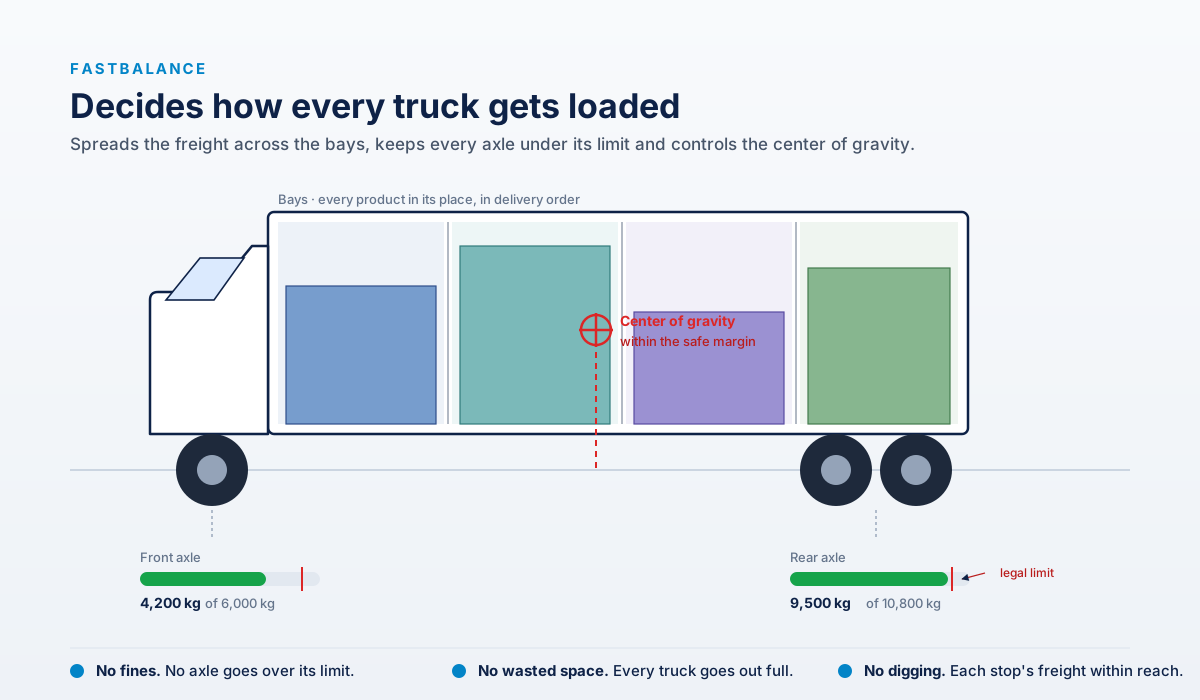
Distribution by bay, every axle under its legal limit, and a controlled center of gravity
The same truck, loaded two ways
The same goods. What changes is where each item ends up.
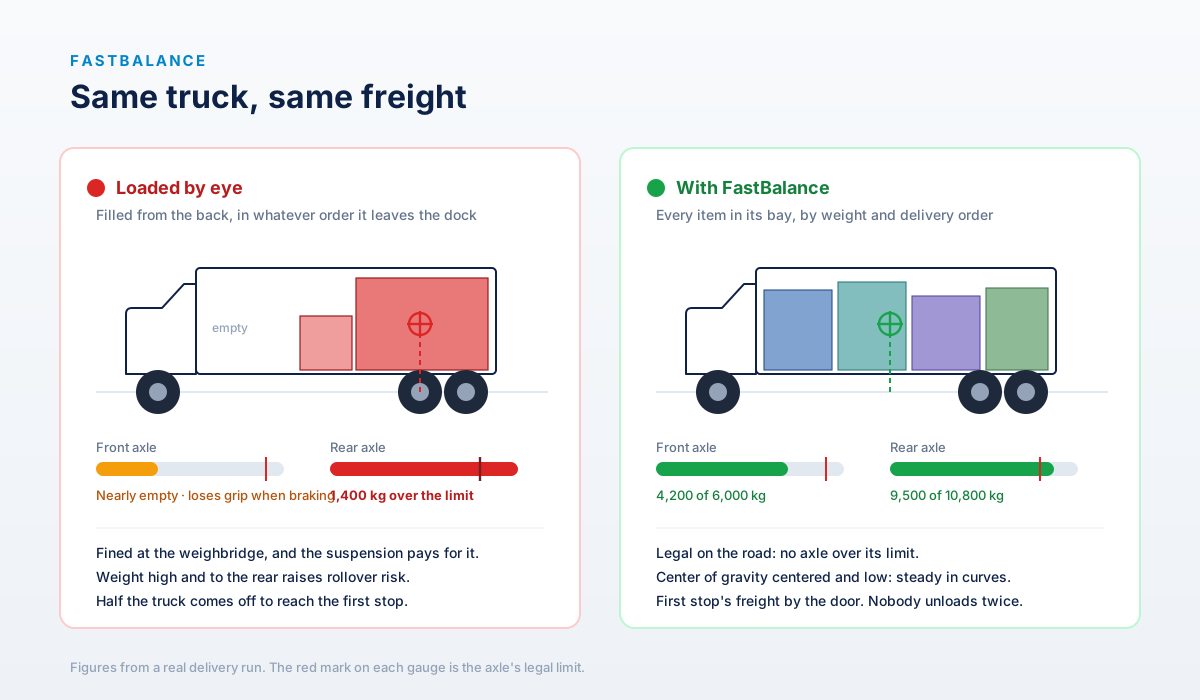
Loaded by eye, the rear axle is 1,400 kg over the limit. With FastBalance both axles come in legal.
Space used and weight per axle
Fill the truck to the brim without going over the permitted weight on any axle.
Use every cubic inch
Optimize the vehicle's space to carry more product per trip and lower the cost per delivery.
- Automatic cubing of cases, pallets and drums.
- Filling by bay or compartment.
- Primary and secondary transport (T1 and T2).
Balance the weight per axle
Spread the load across the axles and stay within the gross weight permitted on each.
- Axle weight updated with every move.
- A red alert when an axle goes over its maximum.
- It extends fleet life and avoids fines.
Bays built to fit
Divide the vehicle's body the way your operation works, not the way it left the factory.
- Bays of any dimension: width, depth and height.
- You can mount them raised off the floor — over a toolbox, a fire extinguisher or the wheel arch.
- Move products between bays and build your own mixes by hand.
The truck from the inside. In this example four bays start 40 cm off the floor because a toolbox sits underneath: FastBalance subtracts that height from the usable space and cubes with what is actually left. Drag to rotate it.
Watch it load
A load plan calculated by FastBalance, cubed bay by bay. Press "Load truck" and drag to rotate it.
Drag on the truck to rotate it. The mouse wheel still scrolls the page.
Weight per axle
No axle goes over its permitted maximum: FastBalance recalculates the distribution with every move and warns you before the load goes over weight.
Rules that protect your product
Set rules by category to reduce damage and shrinkage in transit.
FastBalance honors every rule you configure, but it warns you before one is broken and marks the offending bay in red. The planner decides: the system assists, it does not replace your judgment.
Optimal cubing and palletizing
From the case to the pallet to the container — minimizing shipping cost.
Optimal pallet loads
It calculates palletizing from case dimensions: regular, optimized, display or pinwheel patterns to show particular faces.
Case size design
If you only know the primary packaging, it calculates the ideal case dimensions, honoring proportions and warehouse handling constraints.
Mixed-product pallets
From a list of cases and quantities, it calculates how many pallets are needed and how to group them for shipping.
Container fill
It calculates how many pallets, cases or drums fit in a container, or the optimal mix for an order or shipment.
Layer editor
Rotate and move individual cases to get exactly the pallet pattern you need when the automatic one is not enough.
Reports and export
Pallet, case and packaging drawings with their dimensions, exportable (Excel, CSV, images) to share with the warehouse and operations.
The eight pallets in this plan, built and each placed in its bay. Drag to rotate it.
Truck types and fleet
Create vehicles quickly and reuse characteristics across similar ones.
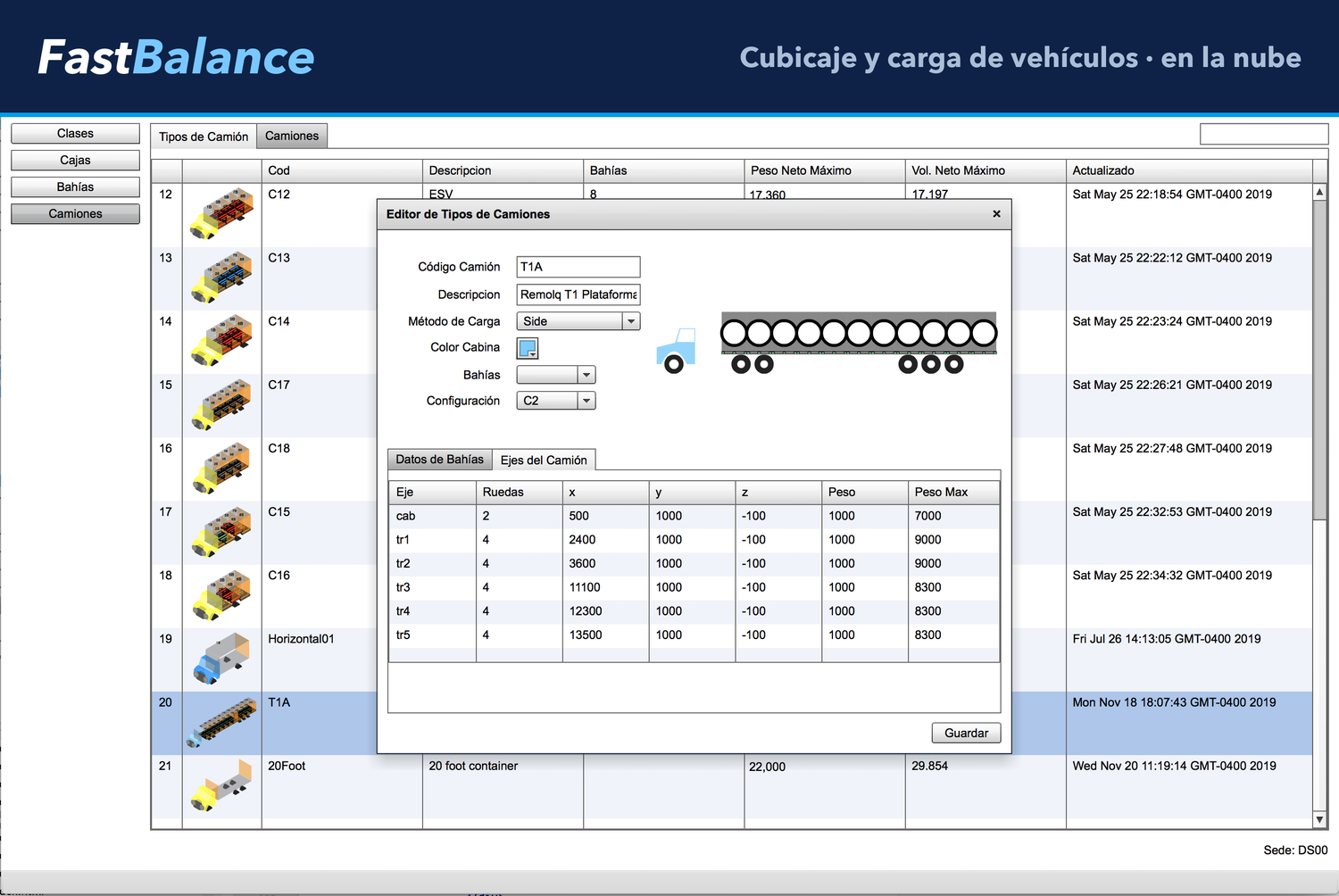
FastBalance does not ship with a closed list of vehicles: if it has dimensions, it can be cubed. You define yours with its dimensions, its axles and its bays, and from there you reuse it across the fleet.
A shipping container is configured just like a delivery truck — the numbers change, the procedure does not. And because every bay knows its turn in both directions, the load can be sequenced to come in through the rear door or through the side doors, depending on how your vehicle opens and how your dock works.
- Delivery truck, straight truck, trailer or container
- Bays built to fit, even raised off the floor
- Configurable axles and maximum gross weight
- Loading sequence through the rear and side doors
- A consistent operation across all your countries
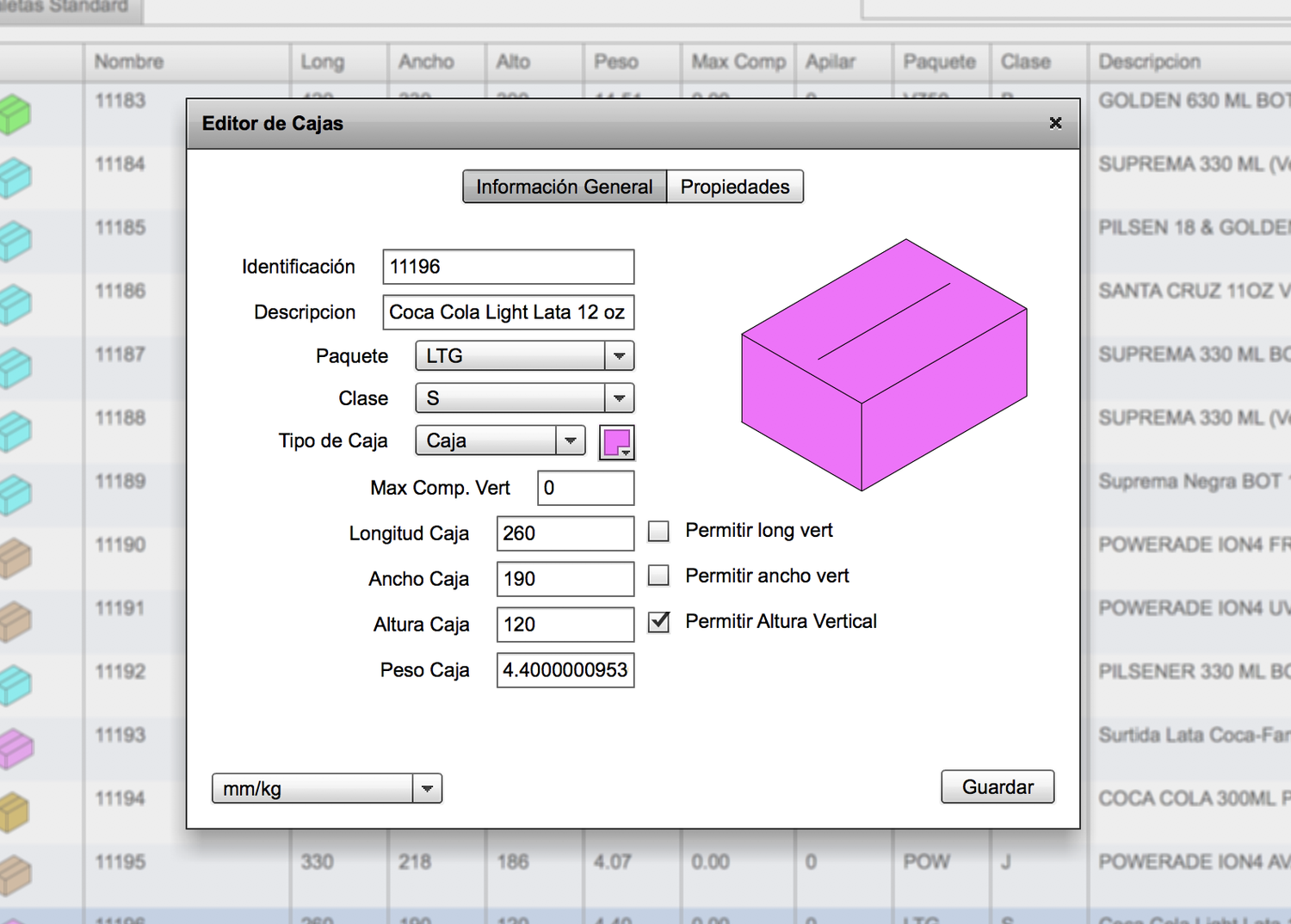
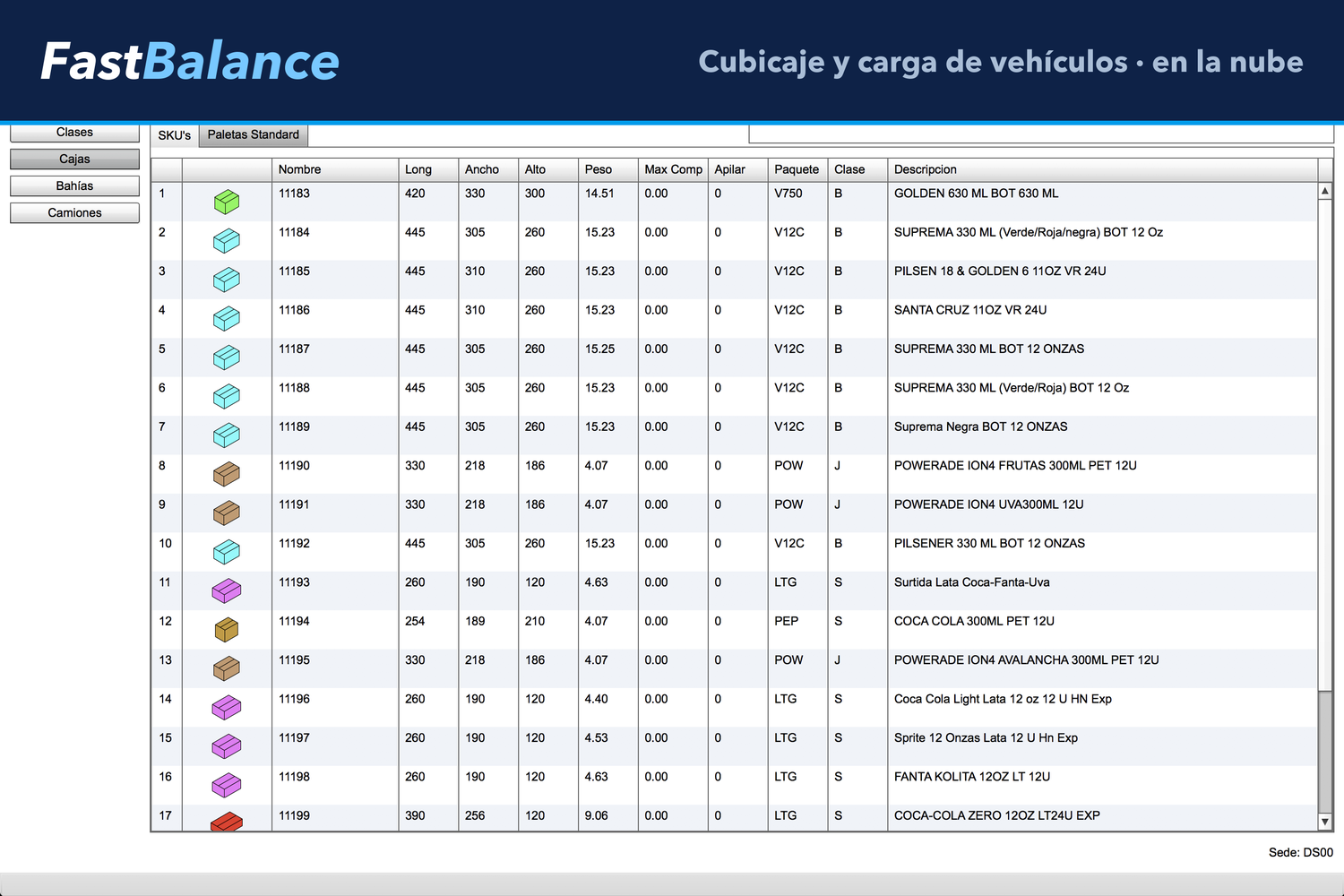
SKU master
The foundation of all good cubing: dimensions, weight and class for every product.
FastBalance stores the SKU master with the dimensions, weight and classification of every product, which feed every cubing and axle weight calculation.
And every SKU can be seen stacked on its pallet. In 3D you grasp at a glance what a spreadsheet hides: how many cases fit per layer, what space is left over on the pallet and how tall the stack ends up. Setting the height stops being a calculation done blind.
- Dimensions, weight and class per SKU
- 3D view of the stack on the pallet
- Load it from Excel by copy and paste
- Mixing rules by product class
- A single source for warehouse and transport
Integration, multi-DC and roles
It fits your current operation, in one site or many.
Connect to your ERP
Web services integration to sync orders, products and load results.
- Compatible with SAP-type and other ERP systems.
- It speeds up planning and loading in the warehouse.
- Export reports and pallet patterns.
Multi-distribution center
Plan truck loads for several centers from a single platform.
- Quick access to each site's information.
- Reuse cases, pallets and truck types.
- A consistent operation across all your countries.
Roles and permissions
Three user levels to control who plans and who executes.
- Administrator: full access and user management.
- Planner: edits data and calculates the load.
- Operator: runs calculations and prints reports.
From the dock to the road
Every truck leaves full, balanced and free of dead space.
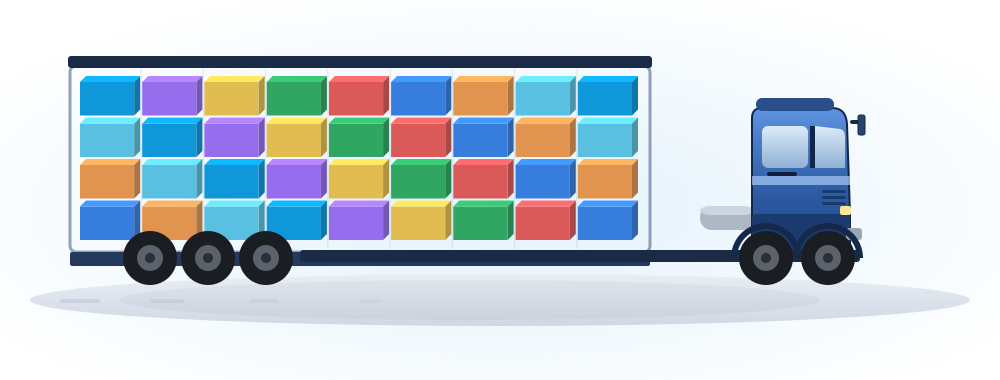
A load optimized layer by layer, balanced across axles — on the road
Key benefits
More load per trip, less risk and lower cost.
More product per trip
Use every cubic inch and cut the number of trips and the cost per delivery.
Safe axle weight
Avoid fines and premature wear by distributing the load properly.
Less damage and shrinkage
Per-product loading rules that protect your goods in transit.
Faster planning
Less time building truck loads and pallets, more time dispatching.
Integrated with your ERP
Orders, products and results synced through web services.
Multi-country and multi-DC
A consistent operation across all your distribution centers.
Frequently asked questions about FastBalance
What people ask us most about vehicle cubing and load planning.
What is FastBalance?
FastBalance is FastRoute's vehicle cubing and load planning module. It uses every cubic inch of the truck, balances weight across the axles and builds the optimal load while honoring your product rules and the legal axle weight limits. It optimizes pallets and containers too.
How does it balance weight per axle?
It spreads the load across the axles and shows each one's weight in real time. With every product move it recalculates the distribution and flags a red box if an axle goes over the permitted maximum.
Can I edit the load by hand?
Yes. You can move products between bays or compartments and build your own mixes. FastBalance warns you before a loading rule is broken and marks the offending bay in red, but the planner decides and can force the exception when needed.
Does it integrate with my ERP?
Yes. It integrates through web services with SAP-type and other ERP systems to sync orders, products and load results, and it serves both primary and secondary transport (T1 and T2).
Does it work for several distribution centers?
Yes. It plans truck loads for several centers from a single platform, with quick access to each site's information and reuse of standard cases, pallets and truck types.
Does it optimize pallets and containers too?
Yes. It calculates optimal pallet loads from case dimensions, designs case sizes, builds mixed-product pallets and calculates container fill to reduce shipping costs.
Get more out of every truck, without going over weight
We will show you FastBalance cubing a real load from your operation.
Request a FastBalance demo